

Apowersoft Screenshot enables you to take screenshot and edit image easily.
Apowersoft Screenshot is a free yet efficient app that lets you surf the Internet, take screenshots and edit images on your phone.该应用程序配备了内置浏览器,提供了有关如何在移动设备上截图的各种提示。 And also, it enables you to screenshot a region of the webpage or even a full webpage with contents beyond the screen. After taking a screenshot, you can crop it and annotate it with lines, arrows, texts, etc. It also allows you to directly share images to popular social networks or upload them to the free cloud space provided by the developer.
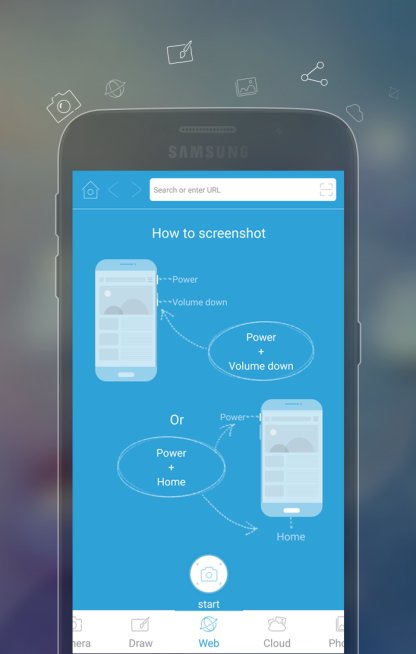
How to take a screenshot
1. Tap the overlay icon (only for Android 5.0 and higher).
2. Press the "Power" button and the "Volume down" button at the same time, or press the "Power" button and the "Home" button at the same time (mostly on Samsung phones).
3. 抓取网页截图。您可以对某个区域、可见内容或整个网页进行屏幕截图。
Other highlight features
# 用线条、圆圈、文本、马赛克等裁剪和注释图像。
# 拍照并立即编辑。
# 用指尖画出你的灵感。
# Share images to popular social networks immediately.
# 将图片上传到免费云空间。
# Additional QR code scanner.
SUPPORTS
官方网站:http://screenshot.net
脸书:https://www.facebook.com/freescreenshot/
推特:https://twitter.com/FreeScreenshot
谷歌+:https://plus.google.com/u/3/117614636045536552999/posts







 动作冒险
动作冒险 模拟经营
模拟经营 角色扮演
角色扮演 体育竞技
体育竞技 休闲益智
休闲益智 卡牌策略
卡牌策略 音乐节奏
音乐节奏 文字解谜
文字解谜 飞行射击
飞行射击 恋爱养成
恋爱养成 商务办公
商务办公 通讯社交
通讯社交 生活娱乐
生活娱乐 网上购物
网上购物 实用工具
实用工具 旅游出行
旅游出行 金融理财
金融理财 教育学习
教育学习 资讯阅读
资讯阅读 体育养生
体育养生